

Reviewed · AIRPORT TRANSFERS
Japan Unlimited WiFi Router – Narita Airport Pickup
In This Review
- A smooth arrival starts with Wi‑Fi
- Key things to know before you go
- Unlimited 4G LTE at Narita: what you’re really buying
- Pickup outside security: your first win after landing
- How the hotspot works on the road (and the device limit issue)
- The daily 3GB high-speed cap: plan like a local user
- What to expect during your rental window (3 to 30 days)
- Price and value: $15.85 per person isn’t a random number
- Common hiccups to watch for: what the reviews hint at
- Who should book this Wi‑Fi router rental (and who should skip it)
- Should you book Japan Unlimited WiFi Router – Narita Airport Pickup?
- FAQ
- Where can I pick up the Wi‑Fi router at Narita?
- How long can I rent the router?
- Is the Wi‑Fi really unlimited?
- What devices can I connect to the router?
- What’s included in the rental?
- What if I don’t pick up the router?
- Can I cancel for a refund?
A smooth arrival starts with Wi‑Fi
Narita is busy, and a working connection right away makes everything feel easier. This Narita Airport 4G LTE Wi‑Fi router rental is interesting because you can grab your hotspot directly at the airport, then use it around Japan to handle the stuff you actually need on day one. What I like most: the pickup setup is quick when you arrive, and the package includes a power bank plus the cables you need for setup. One thing to consider: the rental is advertised as unlimited, but the high-speed data is limited to 3GB per day, so heavy video use can hit that cap fast.
If you’re the kind of traveler who relies on Google Maps, messaging, and quick lookups, this is built for that. It’s also designed around practicality—portable, easy to set up, and meant to keep you from juggling offline maps while you’re on the move.
Worth weighing up alongside this Narita pick:
- Airport transfer: Narita, Haneda (Tokyo), HND-NRT Airport shuttle★ 4.5 · 26 reviews
- Private Transfer from Narita Airport to Yokohama Port and City★ 4.5 · 17 reviews
- Shared Arrival Transfer : Narita International Airport to Hotel (Central Tokyo)★ 4.0 · 12 reviews
Key things to know before you go
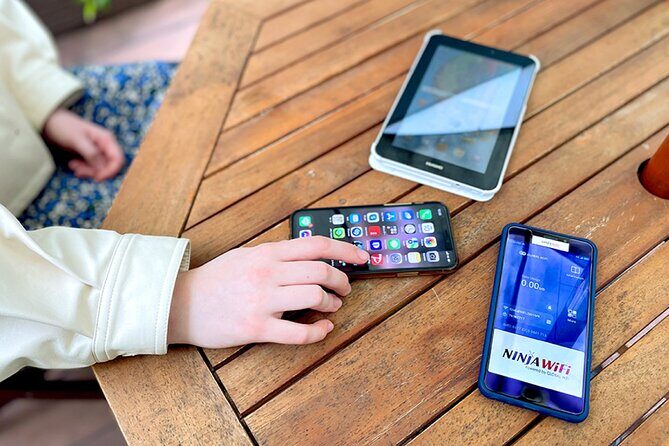
- Narita counter pickup (outside security): you pick up your router at the airport, without needing to pass through security first.
- 4G LTE hotspot that travels with you: you’re not stuck with one terminal’s Wi‑Fi—your connection follows you across Japan.
- Device limit details matter: product info says up to 10 devices, while another description says up to 5 at once.
- High-speed is capped: 3GB/day high-speed data is the tradeoff for the rental being positioned as unlimited.
- Includes power + essentials: router, USB cable, adapter, and a power bank are part of the rental kit.
- Small operation at the counter: it lists a maximum group size of 10 travelers, which can help keep things moving.
Unlimited 4G LTE at Narita: what you’re really buying
This rental is essentially a pre-arrival promise: you show up at Narita, pick up a pocketable router, and immediately have a cellular connection you can share with your devices. The big selling point is the 4G LTE coverage and the fact that it’s usable throughout Japan, not just in airports or hotels.
The word unlimited can be confusing, so here’s the practical way to think about it. You’re renting a data connection that’s meant to stay on for your trip, but your high-speed data is limited to 3GB per day. After that daily high-speed allotment is used, you should expect your connection to be less comfortable for bandwidth-heavy tasks. If your day includes lots of YouTube, long video calls, or constant photo/video uploads, the cap can shape how you use the internet.
The rental also comes with the power bank and the basics for setup (router, USB cable, adapter). That matters more than it sounds. Many airport Wi‑Fi rentals give you a device but leave you to figure out charging right away. Here, the kit is set up so you can keep the router running while you’re on your first train or bus ride.
Pickup outside security: your first win after landing
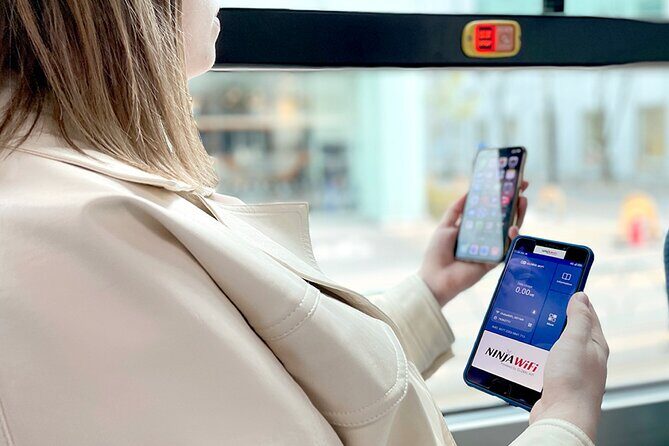
Narita airport Wi‑Fi should not feel like an extra errand. The pickup here is set up with that in mind. Pickup and return counters are located outside airport security, so you don’t have to plan around a “once I pass security, I’m stuck” situation.
You’ll be able to pick up at Terminal 1 or Terminal 2. That flexibility helps if your arrival is assigned to a different terminal than you expected. The rental is also described as near public transportation, which is helpful because it keeps your post-pickup options simple.
One of the strongest signals from the experience feedback is how fast the counter handoff is when everything is ready. A top-rated review described arriving and finding the router already packed and ready at the pickup counter, plus an easy setup. That’s exactly what you want after a flight: minimal waiting, minimal fiddling, and a device that’s ready to go.
How the hotspot works on the road (and the device limit issue)
Once you have the router in your hands, this is the kind of connection that supports the things you’ll do constantly in Japan:
- Navigation and route checking with maps
- Messaging and social apps
- Searching and quick info lookups
- Streaming small amounts of video when you need it
The rental is described as able to connect multiple devices at once. Here’s where you should be careful: the highlights say it can connect up to 10 devices, while another description says it can connect up to 5 devices at once. That’s a real detail worth double-checking for your booking confirmation so you don’t get surprised.
In real life, device limits can affect families, travel groups, or anyone with multiple phones/tablets. If you’re traveling with a friend who always brings a tablet, or you plan to share with kids on multiple devices, you’ll want to treat this like a hard cap. If you’re traveling solo with one phone, you’re unlikely to run into trouble.
Setup is also part of the value. A positive review called the setup easy, and included a note that the power bank is a plus. That matters because a router that dies halfway through your day is worse than no Wi‑Fi at all.





The daily 3GB high-speed cap: plan like a local user

The rental is positioned as unlimited, but your internet speed is managed by the 3GB/day high-speed limit. The practical takeaway: you don’t need to avoid data. You just need to pace it.
Here’s how to use that cap to your advantage:
- Use high-speed for maps, messaging, and quick searches during the busiest travel hours.
- Save video-heavy tasks for times when you’re less likely to need smooth navigation.
- If you’re posting lots of photos or streaming while traveling, assume you can reach the high-speed limit quickly.
What I like about this structure is that it still supports normal tourist behavior extremely well. Most people aren’t continuously uploading 4K video all day. If you’re doing typical “check directions, look up tickets, send messages, find food” internet use, this kind of daily cap often feels manageable.
Just don’t assume you’ll get unlimited top speed all day every day.
What to expect during your rental window (3 to 30 days)

The rental duration is listed as 3 to 30 days, which gives you flexibility if your trip is short or long. The fact that you can choose a period means you’re not paying for time you won’t use.
It also lists mobile ticket use, and you’ll get a confirmation at booking time. That’s helpful because it reduces the chance you arrive at the counter with only a vague idea of what you booked.
On the ground, the “it works” part is usually about your routine:
- Pick up the router at Narita before you head out.
- Power it using what’s included in the kit.
- Connect your devices and start using maps and apps right away.
- Return at the airport when your rental ends.
Since return counters are also outside security, the return part is usually simpler than you might expect. The main thing is not missing it.
Price and value: $15.85 per person isn’t a random number

At $15.85 per person, this is priced like a straightforward, practical add-on rather than a luxury upgrade. Value here comes from what you avoid:
- relying on slower or unreliable public Wi‑Fi
- troubleshooting connectivity when you’re already tired
- getting stuck when you need directions or transit info
It also lists that it’s “super easy” to pick up at the airport and that the package includes the router, power bank, cable, and adapter. Those included items reduce the risk that you’ll need extra gear right after arrival.
One more subtle value point: the rental is set up for convenience at a time when you’re least flexible. Early minutes matter after landing. Being online fast helps you plan the next transport step, find your hotel area, and reduce stress.
Booking info also notes that it’s commonly booked around 20 days in advance on average. That suggests people find this a sensible order to place early, and it’s usually because they don’t want to gamble on arriving without connectivity.
Common hiccups to watch for: what the reviews hint at

The overall rating is 3.4 from 15 reviews, which tells me this is mostly smooth, but not flawless.
The biggest red flag from the feedback: one review reported that router delivery failed when a traveler expected delivery to their hotel, and they struggled to contact anyone to fix it. The key lesson for you is simple: this experience is a Narita airport pickup rental. Don’t count on hotel delivery as part of the service, unless your specific booking explicitly says so.
Two other signals are encouraging:
- A highly rated review described fast, easy pickup and an already-prepared router at the counter.
- Another positive review highlighted that the power bank was a plus.
So yes, this can go smoothly. But your best protection is to align your expectations with what you’re actually booking: pick it up at Narita, use it from there, and don’t build your plan around alternate delivery.
Who should book this Wi‑Fi router rental (and who should skip it)

This is a good match if:
- you want mobile 4G LTE Wi‑Fi right after arriving at Narita
- you rely on Google Maps and travel apps often
- you’re traveling for 3 to 30 days
- you want a shared hotspot for multiple devices
- you want the kit to include power bank + essentials, not just the router
It might not be the best match if:
- you cannot pick up the device at the airport
- you expect it to be delivered to your hotel (based on at least one negative experience, that assumption can cause major problems)
- you plan to do heavy streaming every day without considering the 3GB/day high-speed cap
Also, with a maximum group size listed at 10 travelers, this isn’t a massive cattle-call situation. That’s a plus if you hate waiting in lines, especially after a long flight.
Should you book Japan Unlimited WiFi Router – Narita Airport Pickup?
Yes, I’d book it if your priority is simple arrival connectivity. The combination of airport pickup at Terminal 1 or 2, a counter setup that’s described as fast and ready, and a package that includes a power bank makes it a solid choice for the trip-critical first day.
I’d pause if you’re the type of traveler who streams constantly, or if you’re counting on hotel delivery. The 3GB/day high-speed cap is the tradeoff you should plan around, and your safest bet is to follow the airport pickup model.
If you want fewer stress points on arrival, this is one of those “boring but useful” purchases that often pays off immediately.
FAQ
Where can I pick up the Wi‑Fi router at Narita?
You can pick up the router at Narita International Airport at either Terminal 1 or Terminal 2. The pickup and return counters are located outside airport security.
How long can I rent the router?
The rental duration is listed as 3 to 30 days (you choose the period that fits your trip).
Is the Wi‑Fi really unlimited?
It’s described as unlimited, but high speed data is limited to 3GB per day. After that, you should expect the high-speed portion to be capped.
What devices can I connect to the router?
The information includes conflicting device limits: one part says up to 10 devices, while another description says up to 5 devices at once. Check your booking details for the limit that applies to your rental.
What’s included in the rental?
You receive a Wi‑Fi router (hotspot) plus a USB cable, adapter, and power bank.
What if I don’t pick up the router?
If you do not collect the Wi‑Fi router, refunds will not be provided.
Can I cancel for a refund?
Yes. Cancellation is free if you cancel up to 24 hours in advance, and you can receive a full refund.
More Airport Transfers in Narita



More Tour Reviews in Narita
Fresh reviews from around Narita


Airport Transfers, compared.
 ★ 5.0Private Arrival Transfer : Haneda Airport to Central Tokyo CityFrom $14499 reviews
 ★ 5.0Tokyo VIP Guided Private Car Tour with Optional Airport TransferFrom $1,12256 reviews
 ★ 4.5Shared Arrival Transfer : Haneda Airport to Central Tokyo CityFrom $6228 reviews
 ★ 4.5Airport transfer: Narita, Haneda (Tokyo), HND-NRT Airport shuttleFrom $22426 reviews
 ★ 5.0Private Arrival Transfer : Haneda Airport to Yokohama CityFrom $17221 reviews
 ★ 4.5Private Transfer from Narita Airport to Yokohama Port and CityFrom $14417 reviews
 ★ 4.5Private Airport transfer Haneda Airport(HND) to Tokyo CityFrom $3413 reviews
 ★ 4.0Shared Arrival Transfer : Narita International Airport to Hotel (Central Tokyo)From $10812 reviews
Browse the lists this tour appears in