
Reviewed · TOKYO
Japan: eSIM with Unlimited Local 4G/5G Data
Japan feels smoother when you’re online. What makes this eSIM in Honshu, Japan interesting is the approach: you buy a plan, get a QR code by email, then scan it to connect to Japan’s KDDI(au) network—no SIM card to hunt down. It’s built for people who want fast maps, ride planning, and constant access to the internet right after arrival.
Two things I really like about it are the simple QR-based install flow and the fact you get unlimited 5G/4G local data (with an Ultra option that’s unthrottled). The main drawback to keep in mind is timing and compatibility: the eSIM QR code arrives separately, and activation is after you land in Japan—so you’ll want to double-check your phone supports eSIM and is unlocked first.
One more practical note: the eSIM QR code that comes with your voucher isn’t the actual eSIM QR code, and the 5G signal can switch to 4G indoors or underground. That’s manageable, but it’s better to know now than at the airport.
In This Review
- Key takeaways before you buy
- Unlimited Japan data for a low price: Ultra vs Lite
- Before you fly: make sure your phone can use eSIM
- Your QR code doesn’t match the voucher: how delivery really works
- Activation in Japan: don’t expect it to connect before landing
- Setup reality check: what to do if the QR code says invalid
- Speed expectations: unlimited data, plus realistic 5G behavior
- Plan length and how days are counted in the real world
- Hotspot and tethering: useful, but plan it like a grown-up
- No calls, no texts: what this means for your day-to-day
- Where this eSIM fits best (and where it might not)
- Is it worth $10 for Japan? The value math
- Should you book this Japan eSIM plan?
- FAQ
- Does the QR code on my voucher work?
- When will the eSIM connect to the network?
- What if I see a QR code is invalid message?
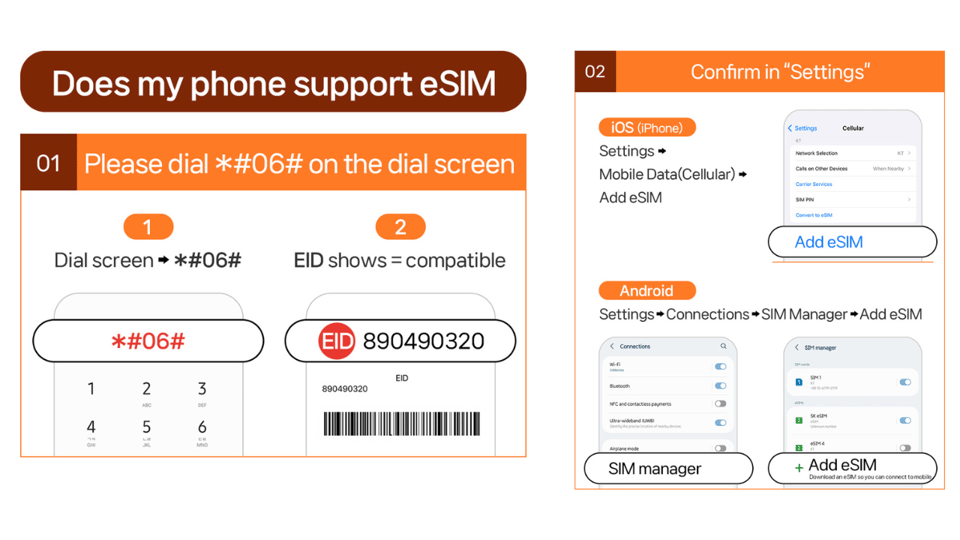
- How do I check if my phone supports eSIM?
- Does the plan include voice calls and SMS?
- Is the internet truly unlimited?
- Can I use hotspot tethering?
- How long do the plans last?
- When does the day count start for the plan?
- Can I get a refund after the eSIM QR code is sent?
Key takeaways before you buy
- Ultra vs Lite speed difference: Ultra is unlimited with no throttling; Lite is unlimited but capped at max data speed of 10Mbps.
- Real eSIM setup matters: the QR code for installation is sent by email about 1 day before the date, not the voucher QR code.
- Activation happens in Japan: you connect to the local network after you arrive, so plan your first-day setup accordingly.
- Hotspot works, with limitations: tethering is supported, but restrictions depend on which plan you pick.
- Coverage includes tough spots: you should expect strong performance even on transit days, though 5G can drop to 4G indoors.
Before you commit, see how this one stacks up against a few Tokyo favourites:
- Mt Fuji and Hakone 1-Day Bus Tour Return by Bullet Train★ 5.0 · 26,383 reviews
- 1-Day Tokyo Bus Tour★ 5.0 · 14,250 reviews
- Tokyo: teamLab Planets TOKYO Digital Art Museum Entry Ticket★ 4.6 · 9,779 reviews
Unlimited Japan data for a low price: Ultra vs Lite
At $10 per person, the value here is pretty straightforward: you’re paying for local Japanese data access without the hassle of a physical SIM. The plan targets a very specific pain point—arriving in Japan and immediately needing internet for navigation, translation, checking transit updates, and booking things on the fly.
Here’s the key choice: Ultra or Lite.
- Ultra (KDDI au 5G/4G): Unlimited 5G/4G local data with no throttling. Voice and SMS are not included.
- Lite (KDDI au 5G/4G): Unlimited 5G/4G local data, but with max data speed 10Mbps. Voice and SMS are not included.
So how do you decide? If you’ll upload photos, rely on video calls, stream regularly, or you just hate any speed caps, Ultra tends to be the calmer choice. If you mainly use maps and messaging apps over Wi‑Fi alternatives, and you’re okay with a ceiling on speed, Lite can be a great budget move.
One more detail that affects your real experience: the eSIM coverage area is listed as Japan (no separate regional restriction is stated beyond Honshu context in the product overview). In practice, that means you’re not trying to make a “regional SIM” work for a full Japan trip.
Before you fly: make sure your phone can use eSIM
This is one of those purchases that goes smoothly when your device is ready—and gets annoying when it isn’t. Before buying, confirm two things:
- Your phone supports eSIM
- Dial #06# and check whether EID shows. If EID does not show, your device is incompatible with eSIM.
- Your phone is unlocked
- It must be unlocked for a foreign SIM/eSIM.
Those two checks save you from the most common “it won’t install” situation. And because the setup is QR-based, you want your phone’s mobile settings to be ready before you arrive.
Also note: voice calls and SMS are not included. This matters less than it used to—most people use data apps for messaging—but it does mean you shouldn’t count on the phone-number basics working. Your internet data is what you’re buying.
Your QR code doesn’t match the voucher: how delivery really works
This is the biggest “gotcha,” and it’s spelled out clearly: the QR code on your GetYourGuide voucher is not the eSIM QR code.
Instead, the actual eSIM QR code is sent by email about 1 day before the activity date. That means you can’t just scan the voucher QR code and assume you’re set.
Practical tip: once you buy, keep an eye on your email around the day-before window. If you don’t see the eSIM QR code when you expect it, it’s better to resolve that before you land.
There’s also a timing rule: the eSIM QR code must be installed and activated within 30 days of purchase. If you’re traveling later than you thought, don’t sit on it.
Activation in Japan: don’t expect it to connect before landing
Another detail you’ll want to plan around: the eSIM will connect to the local network after you have arrived in Japan.
That means your setup flow is basically:
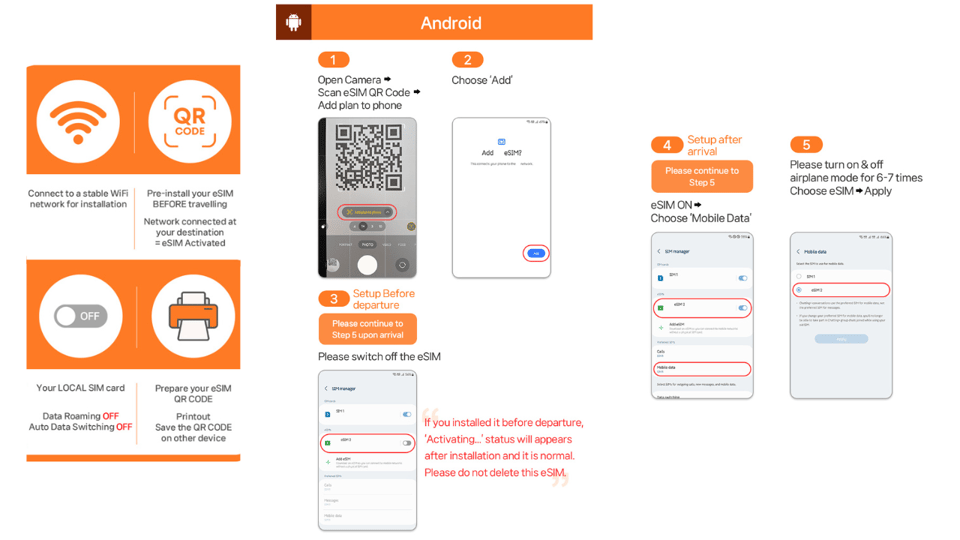
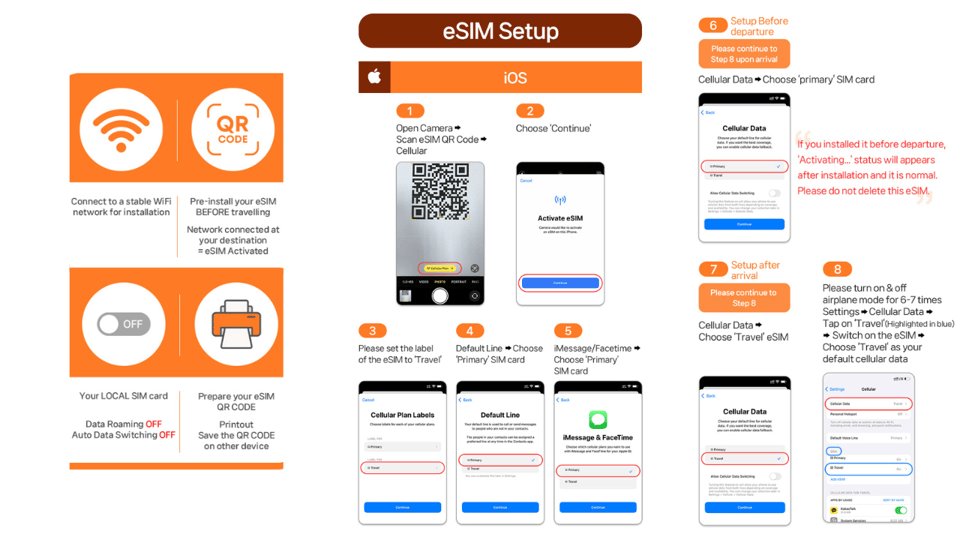
- Install the eSIM profile on your phone
- Only then, when you’re in Japan, activate so it can connect to the KDDI(au) network
This is usually fine, but it affects how you think about the first evening. If you land and immediately need navigation, you’ll be happiest if you’re ready to install the profile right away after arrival.





Setup reality check: what to do if the QR code says invalid
If you ever see a message like QR code is invalid, don’t panic. The fix is usually inside your phone’s SIM/eSIM manager.
Do this:
- On iOS: go to Settings > Cellular (iOS)
- On Android: go to Settings > Connections > SIM Manager (Android)
Then check whether a new eSIM profile is showing on the page.
If nothing appears, contact the supplier using the email or WhatsApp details shown in the setup info. The product also provides an eSIM setup guide and FAQ link (https://psce.pw/79uszq-).
This “check your SIM Manager first” step is a big time-saver. It keeps you from repeatedly rescanning when your phone is actually already showing the profile, just not connecting yet.
Speed expectations: unlimited data, plus realistic 5G behavior
On paper, you’re getting unlimited 5G/4G local data on KDDI(au). In reality, wireless networks behave like wireless networks.
Here’s what the plan explicitly warns you about:
- 5G signal may be affected by location such as indoors, underground, or in crowded areas
- When that happens, the network may switch to 4G
That’s not a failure. It’s normal radio behavior, and it’s exactly why many people choose a local plan instead of relying only on free Wi‑Fi. Even when you’re off 5G, you still keep data access—so your maps and messaging apps should keep working.
Also remember the Lite cap:
- Lite max speed is 10Mbps
So if you’re doing anything heavy—video streaming in motion, big uploads, lots of photo sharing—Ultra is the safer bet.
Plan length and how days are counted in the real world
Your plan duration depends on which option you choose:
- Ultra: 3–30 days
- Lite: 3–10 days
Lite has an extra usage detail: data speed is capped, and the plan’s data allotment is calculated based on calendar days. It starts from your first connection to the KDDI(au) network in Japan.
Example the product gives: if activation is at 10 PM Japan time, it counts as 1 full day by midnight. So your “day count” is tied to Japanese time and the moment you connect, not the moment you bought the plan.
Also listed: the hotspot feature is supported with limitations depending on the plan, and you’ll get a data figure tied to duration (for example, 3 days/3GB, 5 days/4GB, 10 days/9GB, and up to 30 days/30GB). That’s a different structure than “unlimited hotspot forever,” so it’s better to treat tethering as a tool, not your whole travel power source.
Hotspot and tethering: useful, but plan it like a grown-up
If you’re traveling with a tablet, laptop, or a second phone, hotspot sharing (tethering) is included—but with limitations that depend on the selected plan.
Because the data experience includes “unlimited local data” in the main connection, it’s tempting to assume tethering will be unlimited too. Don’t assume that. Use hotspot when you truly need it, like:
- When your hotel Wi‑Fi is weak
- For uploading a batch of photos from your camera
- When your laptop needs to work while you’re out
For daily sightseeing, I recommend you reserve tethering for short bursts. That way your connection stays reliable and you don’t accidentally hit any hotspot restrictions.
No calls, no texts: what this means for your day-to-day
This plan explicitly includes no voice and no SMS.
That doesn’t mean you’ll be unreachable. It means you should rely on data-based communication methods such as:
- Internet messaging apps
- Map and transit tools
So if you depend on a phone number for verification texts or you’re expecting regular SMS from services, you might have a problem. The plan doesn’t promise SMS support, so it’s smart to be ready with an alternate method (like an existing Wi‑Fi plan at your base, or using apps that don’t require SMS).
Where this eSIM fits best (and where it might not)
This is the kind of travel tech that fits you best if you:
- Want to avoid a physical SIM
- Need steady internet access for navigation and planning
- Have an eSIM-capable phone and want a straightforward QR install
- Are comfortable handling setup steps at the right time (before landing for install, after landing for activation)
It’s less ideal if:
- Your phone can’t do eSIM (EID won’t show on #06#)
- You’re relying on SMS for key logins or verification codes
- You hate managing settings during travel (because troubleshooting is done through the SIM Manager screens)
A practical comfort factor: real-world feedback for this kind of plan often centers on the fact it works even on transit days like subways and crowded rides, where coverage can be inconsistent. Still, the product’s own note about 5G switching to 4G indoors is the part you should take seriously.
Is it worth $10 for Japan? The value math
Even if you ignore the fancy details, here’s what you’re buying:
- Local KDDI(au) 4G/5G connectivity
- Unlimited local data (with Ultra unthrottled, Lite capped)
- eSIM convenience (scan and go)
- Hotspot capability, depending on plan limits
- No calls/SMS, which you should treat as a tradeoff
For short trips, the price is especially compelling because your cost is low compared to lots of international roaming add-ons. For longer trips, Ultra becomes more valuable if you care about consistent speed.
My rule of thumb:
- Choose Lite if you mainly need maps and browsing and you’re okay with capped speed at 10Mbps.
- Choose Ultra if your trip includes heavier data use and you want the smoothest experience.
Should you book this Japan eSIM plan?
If you’re planning a Japan trip and you want the simplest path to reliable data without chasing a SIM shop, I’d say yes—with one condition: confirm your phone supports eSIM and is unlocked before you buy.
Book this plan if:
- You want unlimited 4G/5G local data on KDDI(au)
- You can follow the email timing for the correct eSIM QR code
- You’re okay relying on data apps since there’s no voice or SMS
Skip it (or consider an alternative) if:
- You need SMS-based verification a lot
- Your device can’t show EID at #06#
- You need everything to work instantly without any setup on arrival
FAQ
Does the QR code on my voucher work?
No. The QR code on the voucher is not the eSIM QR code. The correct eSIM QR code is delivered to you separately by email about 1 day before the activity date.
When will the eSIM connect to the network?
The eSIM will connect to the local network after you have arrived in Japan.
What if I see a QR code is invalid message?
Check your phone’s SIM/eSIM settings. On iOS, go to Settings > Cellular. On Android, go to Settings > Connections > SIM Manager, and see if the new eSIM profile appears.
How do I check if my phone supports eSIM?
On the dial screen, enter #06#. If you see an EID, your device supports eSIM. If EID does not show, it’s incompatible.
Does the plan include voice calls and SMS?
No. Voice and SMS are not included.
Is the internet truly unlimited?
You get unlimited 5G/4G local data. Ultra is listed as unthrottled, while Lite has a max data speed of 10Mbps.
Can I use hotspot tethering?
Hotspot sharing is included, but it comes with limitations depending on the plan you select.
How long do the plans last?
Ultra can be selected for 3–30 days. Lite is available for 3–10 days.
When does the day count start for the plan?
Usage is calculated based on calendar days starting from the first connection to the KDDI(au) network in Japan (with the example that an activation at 10 PM Japan time counts as 1 full day by midnight).
Can I get a refund after the eSIM QR code is sent?
Refunds are not accepted once the eSIM QR code has been sent. Cancellation is listed as possible up to 24 hours in advance for a full refund.
More Tour Reviews in Tokyo



Fresh reviews from around Tokyo






Tokyo, compared.
 ★ 5.0Mt Fuji and Hakone 1-Day Bus Tour Return by Bullet TrainFrom $16326,383 reviews
 ★ 5.01-Day Tokyo Bus TourFrom $12914,250 reviews
 ★ 4.6teamLab Planets TOKYO Digital Art Museum Entry TicketFrom $259,779 reviews
 ★ 4.0Mt Fuji & Hakone Cruise, Drum Show Bullet Train 1 Day from TokyoFrom $1497,413 reviews
 ★ 5.0Shinjuku Food Tour (13 Dishes at 4 Local Eateries)From $866,603 reviews
 ★ 4.4Tokyo Mt Fuji 5th St & Hakone Cruise Bus Tour w/Bullet TrainFrom $1545,024 reviews
 ★ 5.0Flagship 2-Hours Official Street Go-Kart Tour – Tokyo Bay ShopFrom $644,974 reviews
 ★ 4.5From Tokyo: Mount Fuji Full-Day Sightseeing TripFrom $684,970 reviews